
Retail & supermarkets

Retail POS and inventory software that keeps every store in stock

Covadesk runs the till and the back office together: counter POS sessions with cash, M-Pesa, card and voucher tenders, stock levels per store and warehouse, reorder levels, purchasing from suppliers, and eTIMS invoices — all posting to one general ledger.

Built for: Supermarkets, minimarts, hardware stores, pharmacies-as-retail, agrovets, electronics and fashion retailers, single-store or multi-branch.

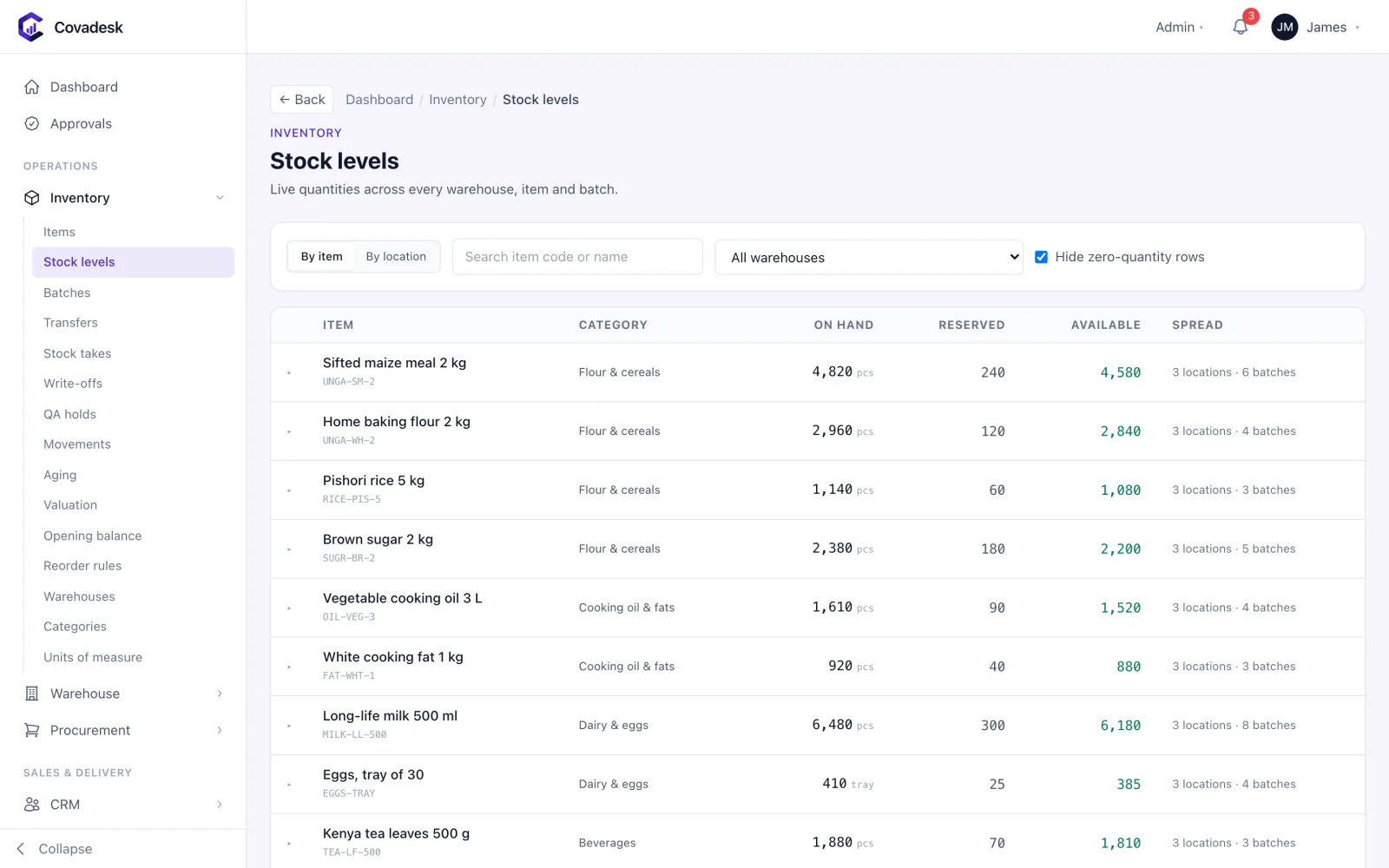
Covadesk stock levels by item with on-hand, reserved and available quantities

The problems we solve

Where retailers lose money — and how Covadesk closes the gap

  • Stock-outs on fast movers

    Reorder levels per store and warehouse show what needs buying before the shelf is empty.

  • Tills that don’t balance

    POS sessions open on a float and close on counted tenders — cash, M-Pesa, card and voucher — per cashier.

  • Expired goods on the shelf

    Batches carry expiry dates and can be picked first-expiry-first-out, with QA holds that block sale.

  • Branches emailing spreadsheets

    Every store sells into the same system, so group stock and sales are always current.

See it in action

What retailers see in Covadesk

Real Covadesk screens, shown with sample data.

Covadesk stock levels by item with on-hand, reserved and available quantities

Live quantities across every store and warehouse.

Features

Everything retailers need, in one system

Counter POS

Fast selling at the counter.

  • POS sessions per cashier and terminal with an opening float
  • Cash, M-Pesa, card and voucher tenders
  • Counter sales to walk-in or account customers, under their credit limit
  • Session close with counted tenders and variance
  • eTIMS invoice on every sale

Stock control

What is on hand, where, and what it is worth.

  • Stock levels per store, warehouse and batch
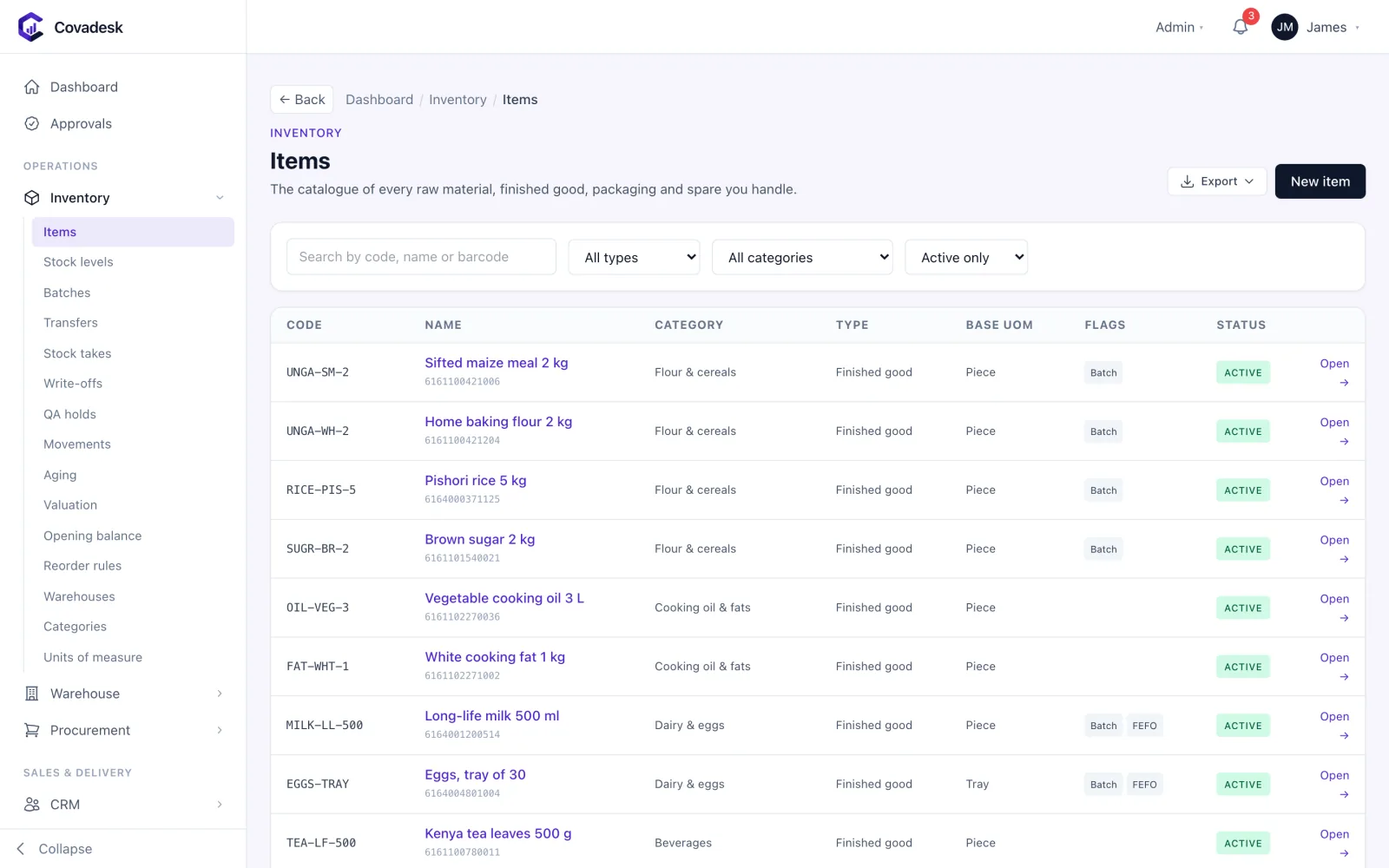
  • Barcodes, categories and units of measure on every item
  • Reorder levels and stock takes with variance approval
  • Transfers between stores with in-transit stock
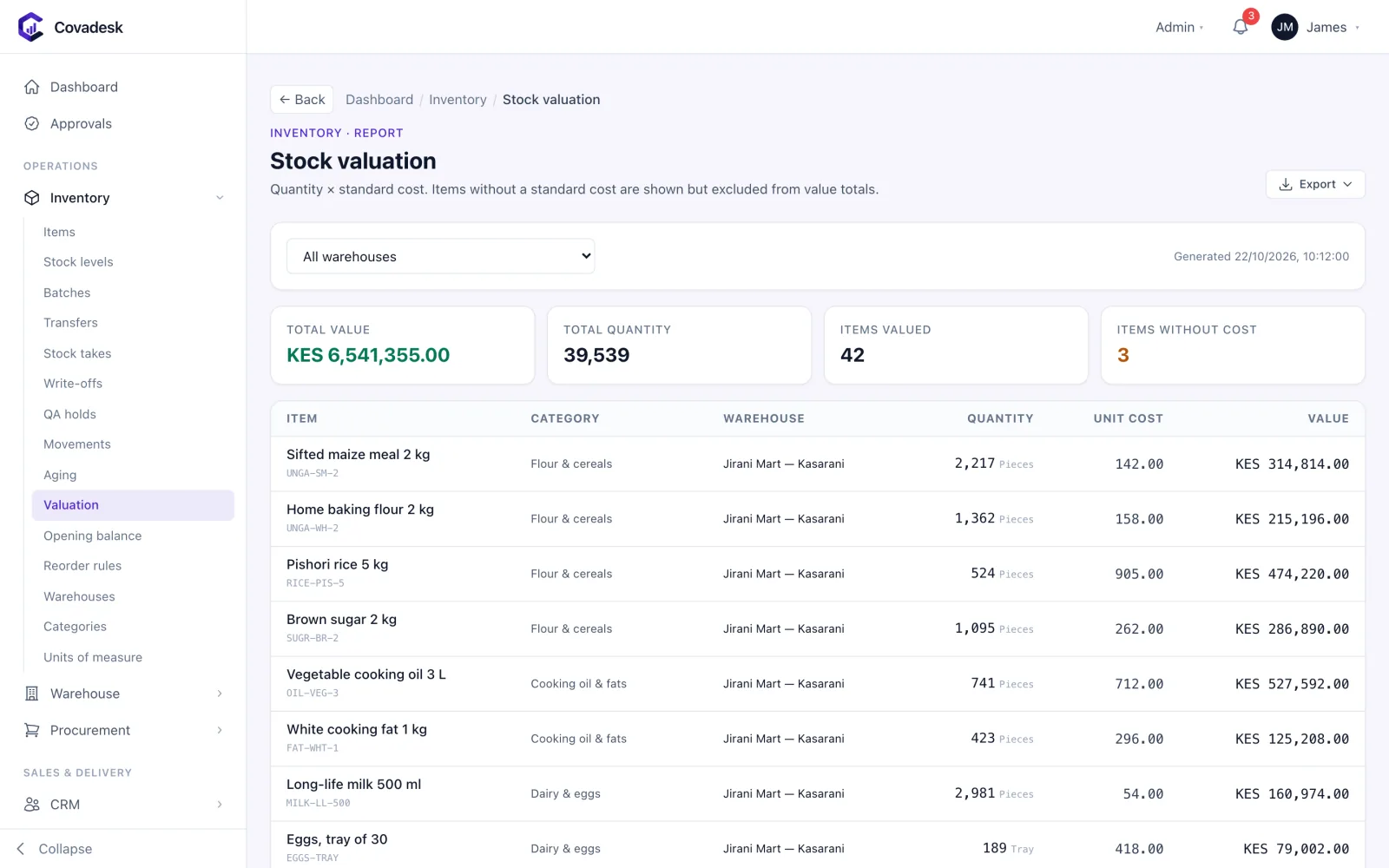
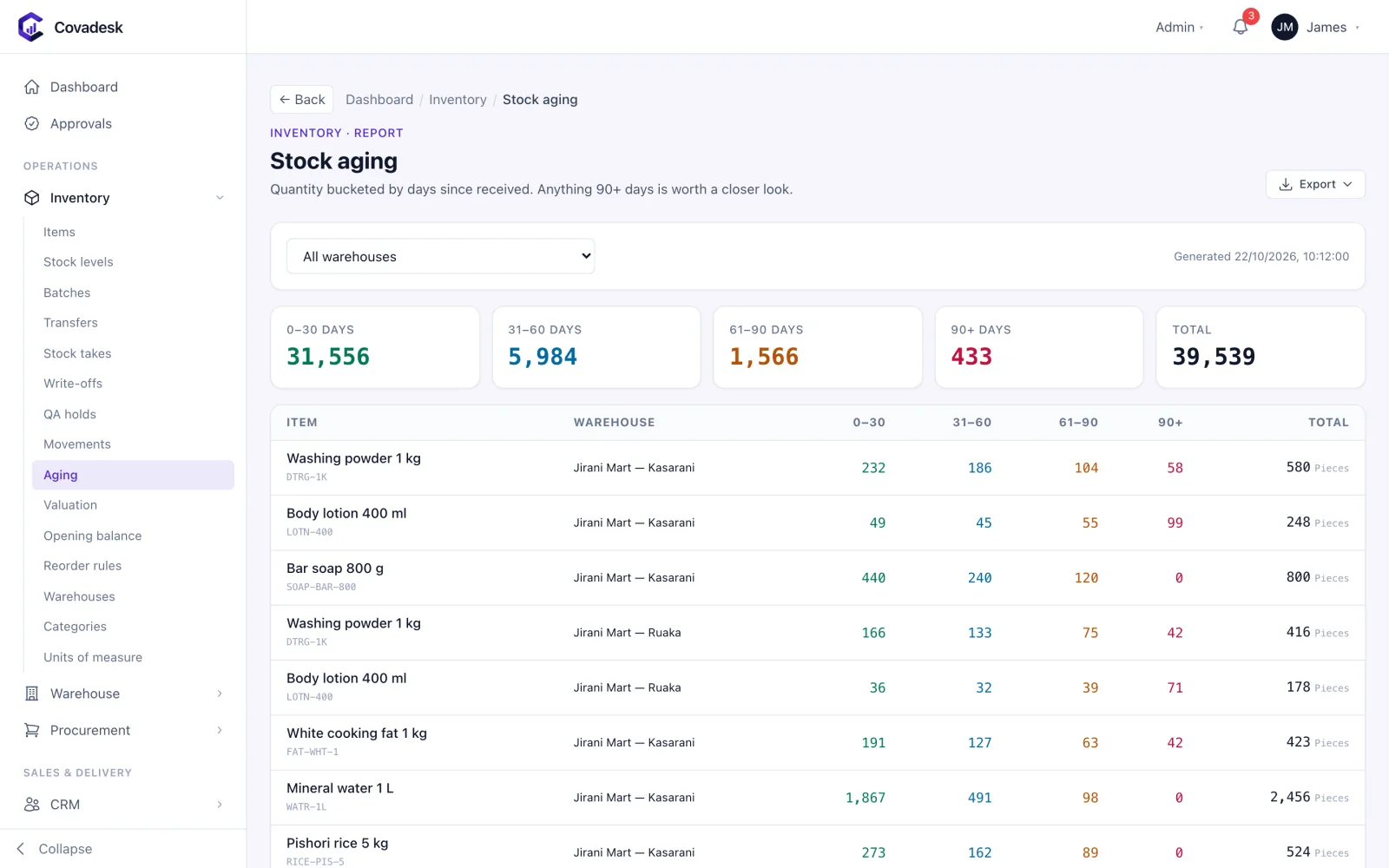
  • Valuation and ageing reports that tie to the ledger

Purchasing

Buying from suppliers with control.

  • Requisitions, purchase orders and goods received
  • Supplier invoices matched to the PO and GRN
  • Supplier balances and payments

Sales reporting

What sold, through which channel, and what it earned.

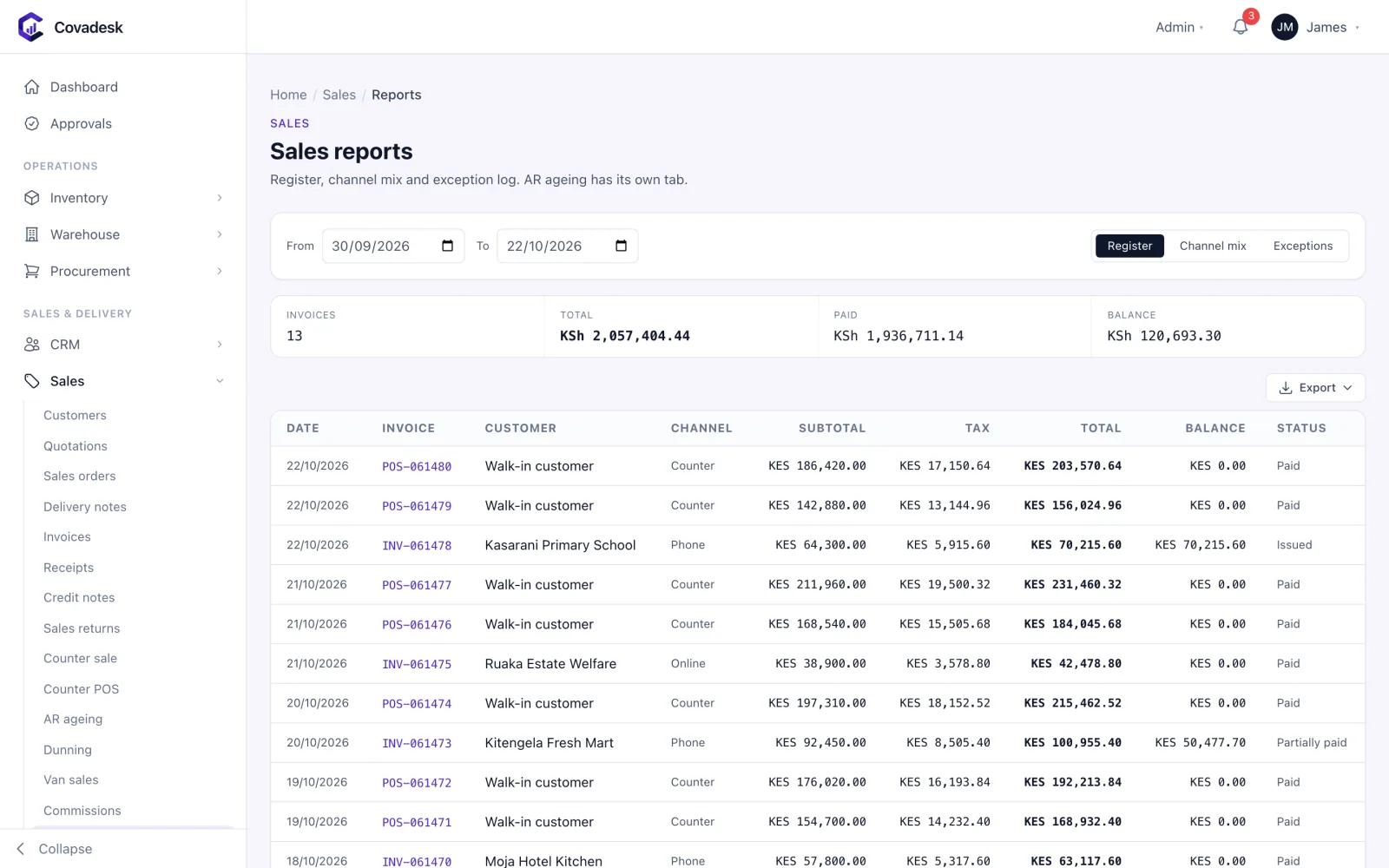
  • Sales register by date, invoice and channel
  • Channel mix — POS, counter, orders
  • Exceptions such as voids and credit notes

Back office

Everything else a retailer runs on.

  • General ledger, bank reconciliation and VAT
  • Staff payroll with Kenyan statutory deductions
  • Customer accounts, statements and AR ageing

How it flows

One process, start to finish

  1. 01

    Buy

    Raise POs and receive stock into the store.

  2. 02

    Open the till

    Cashiers open a session on a counted float.

  3. 03

    Sell

    Scan, tender and print the eTIMS receipt.

  4. 04

    Close the till

    Count tenders; the variance is recorded.

  5. 05

    Replenish

    Reorder levels drive the next purchase.

  6. 06

    Account

    Sales, stock and cash post to the ledger.

Modules included

The Retail & Supermarket pack

Single or multi-store retail with POS, promotions and loyalty.

Industry modules for retailers

Switched on by the pack from day one, on top of the backbone below.

  • CRM

    Commercial

    A sales pipeline that ends in a real invoice

    • Leads, contacts and accounts linked to the customer ledger
    • Opportunity pipeline by stage with weighted forecast and win rate
    • Follow-ups and activities assigned to owners with due dates
    • Lost reasons captured so the pipeline teaches you something
  • Warehouse Management

    Operations

    Bin-level control inside the warehouse

    • Visual bin map by zone, with occupancy and fill levels
    • Directed putaway and picking
    • Cycle counts by bin and a full scan log
    • Bin stock reconciled continuously against the inventory ledger

The backbone every Covadesk business runs on

The same core modules run across every industry, so purchasing, stock, sales, accounts and people share one database and one version of the truth.

  • Procurement

    Operations

    Buy with control, from requisition to supplier payment

    • Purchase requisitions routed for approval by value, branch and role
    • Requests for quotation with side-by-side supplier comparison and award
    • Purchase orders that inherit item VAT rates and approved prices
    • Goods received notes with QA tolerance bands for weight, moisture and grade
    • Three-way match of PO, GRN and supplier invoice before anything is paid
    • Supplier advances tracked and recovered against later invoices
    • Supplier register with categories, terms and performance history
  • Inventory

    Operations

    One stock figure that finance and the store agree on

    • Multi-warehouse stock levels, by item, location and batch
    • Batch and expiry tracking with QA holds that block issue until released
    • Inter-branch and inter-warehouse transfers with in-transit stock
    • Stock takes with variance approval and automatic write-off postings
    • Reorder levels per warehouse and full movement history per item
    • Stock ageing and valuation reports that tie to the general ledger
    • Units of measure with conversions — buy in bags, sell in kilos
  • Sales

    Commercial

    Quote, sell, invoice and collect in one flow

    • Quotations that convert to sales orders, delivery notes and invoices
    • Counter POS and counter sales with cash, M-Pesa, card and voucher tenders
    • Price lists and customer categories with credit limits enforced at order time
    • Credit notes, returns and receipts — including refunds on the receipt
    • AR ageing, dunning and credit-override approvals with an audit trail
    • Van sales with load-out, field selling and end-of-day reconciliation
    • Sales commissions and a sales register by channel and period
  • Finance & Accounting

    Finance

    A general ledger every module posts into as it happens

    • Chart of accounts, accounting periods and period close
    • Journals with approval, plus automatic postings from every module
    • Bank accounts, statement import and bank reconciliation
    • Supplier payments, petty cash and AP ageing
    • VAT and withholding tax computed at the transaction line, with returns data
    • Budgets by account and cost centre, with budget-versus-actual
    • Trial balance, profit and loss, balance sheet and cash flow on demand
  • Human Resources

    People

    Your people, their records and their requests in one place

    • Employee records with contracts and organisation structure
    • Leave policies, balances, requests and approvals — with self-service
    • Attendance capture and shift rosters
    • Appraisals and disciplinary cases with a recorded outcome
    • An HR service desk for employee requests
  • Payroll

    People

    Kenyan payroll that is right the first time

    • Pay runs with maker-checker approval before release
    • PAYE on current KRA bands with personal relief
    • NSSF, SHIF and Affordable Housing Levy calculated per employee
    • Salary structures, allowances, deductions and staff loans
    • Statutory return files and payslips generated from the same run
    • Payroll journals posted straight to the general ledger
  • Fixed Assets

    Finance

    A fixed asset register your auditor will sign

    • Asset register by category, location and custodian
    • Scheduled depreciation posted to the ledger
    • Disposals with gain or loss calculated and booked
    • Transfers between branches with history
  • Delivery & Fleet

    Operations

    Get orders out of the gate and onto the road

    • Dispatch runs that load delivery notes onto a vehicle and driver
    • Vehicle and driver registers with documents and expiry dates
    • Delivery routes and run status from loading to complete
    • Fuel issues and vehicle maintenance logged per vehicle
  • Reports & Analytics

    Insights

    Answers across every module, without exporting to Excel

    • Executive dashboard with cash, sales, stock, output and receivables
    • Ready-made payroll, HR, sales, stock and finance reports
    • Saved reports, with exports to CSV, Excel and PDF
  • Integrations

    Settings

    Connected to the systems Kenyan businesses depend on

    • KRA eTIMS invoice and credit-note transmission with retry and a send log
    • M-Pesa C2B, STK Push and B2C through Daraja, matched to customer accounts
    • SMS and email notifications
    • Webhooks and API keys for your own systems

Add more when you need it

Any other module can be switched on for your organisation — same data, nothing to re-implement.

  • Projects & Job Costing
  • Manufacturing (Work Orders & MRP)
  • Quality Management (QMS/LIMS)
  • Maintenance (CMMS)
  • Contract Management
  • Documents
  • Customer & Supplier Portals
  • Helpdesk / Service
  • BI & Workflow Builder
  • Production (Batch/Process)
  • DigiSales (Field Sales)
  • Milling Intake & Weighbridge
  • Construction & Contracting
  • Real Estate & Property
  • SACCO / Microfinance
  • Logistics / 3PL
  • Agriculture & Agribusiness
  • Fuel Stations & Petroleum
  • Automotive Workshops
  • Professional Services
  • NGO / Donor-Funded
  • Hospitality

Compliance

Kenyan rules, built in

KRA eTIMS
Every sale transmitted to eTIMS with retry and a send log.
VAT
Item VAT rates applied at the line, with returns data from the ledger.
M-Pesa
Till payments received and reconciled.
Payroll statutory
Staff payroll with PAYE, NSSF, SHIF and Housing Levy.

Questions

Covadesk for retailers: common questions

Does Covadesk have a POS?

Yes. Counter POS sessions open per cashier and terminal with a float, take cash, M-Pesa, card and voucher tenders, and close with counted takings and the variance. Every sale produces an eTIMS invoice.

Can it run several stores?

Yes. Each store is a branch with its own warehouses and tills, users are scoped to their stores, and group reports roll up stock and sales.

Does Covadesk support barcodes and expiry dates?

Yes. Items carry barcodes, and batch-tracked items carry expiry dates with optional first-expiry-first-out picking and QA holds.

See Covadesk running for retailers

Book a 30-minute demo. Bring a real problem — a stock variance you can’t explain, a payroll run that takes three days — and we’ll show you how it works in Covadesk.

Prefer to talk? Call +254 117 390 922 or email info@fecn.co.ke